A completed job is in your email. The invoice is still missing from QuickBooks. OpenAI’s ChatGPT for Accounting demo shows a prompt that finds jobs ready to bill, checks for duplicates, and prepares invoice drafts for review. The person still decides what to approve.
Watch MosoFin’s ChatGPT for Accounting invoice workflow video. It follows the invoice example and shows where a separate financial-data review could fit. The MosoFin scenario in the video is illustrative, not an Accounting plugin feature.
That example makes the new Accounting plugin easier to understand: it helps move records into an accounting workflow. It does not remove the need to check the customer, amount, tax treatment, and supporting job details.
Quick answer: ChatGPT for Accounting can gather records, suggest coding, prepare drafts, compare workpapers, and help with reports. Connected apps and their permissions determine what it can access or change. Review the source records and every proposed entry before approval.
What the invoice demo actually shows
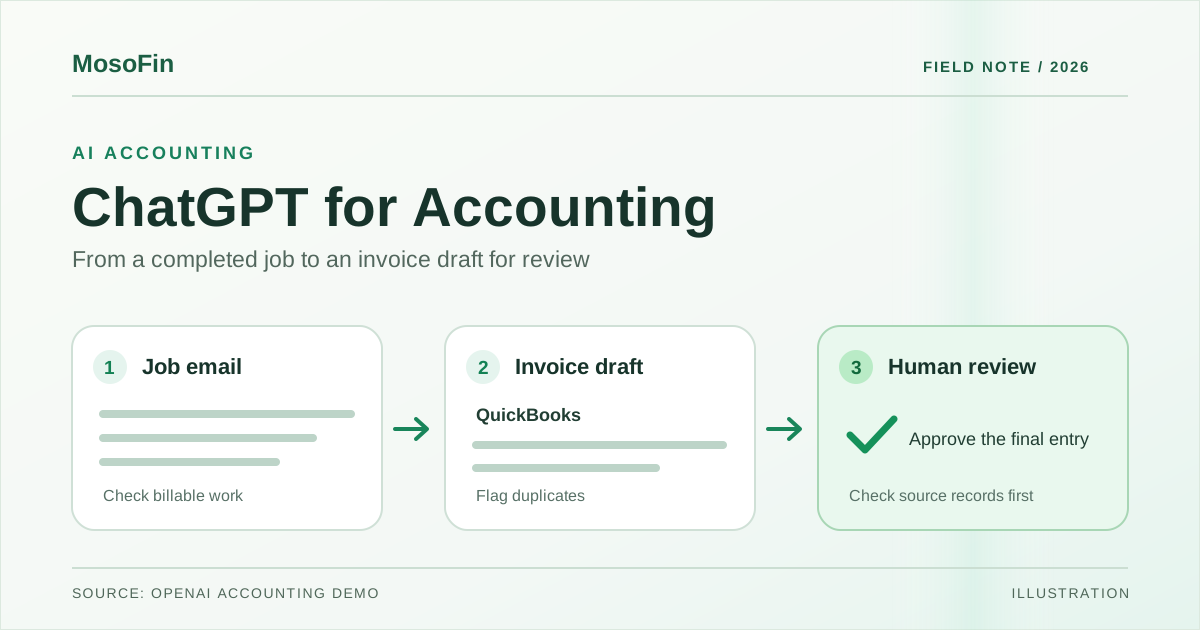
The example starts with job details in email. ChatGPT searches for jobs ready to invoice, checks for possible duplicates, and prepares drafts in QuickBooks. Its summary calls out items that need attention. The drafts appear in QuickBooks for a person to review.
For a firm or owner, the useful sequence is:
- Find the source. Confirm that the email describes completed, billable work.
- Check for an existing invoice. A duplicate draft can lead to a duplicate charge if it goes unchecked.
- Review the draft. Check the customer, line items, price, dates, tax, and any missing detail against the job record.
- Approve in the accounting system. Keep the final decision with an authorized person.
This is one demonstrated workflow. It does not prove that every connected accounting app supports the same invoice actions.
Four other jobs OpenAI describes
OpenAI’s accounting page also describes these uses:
| Job | What ChatGPT prepares | What a reviewer checks |
|---|---|---|
| Process invoices and receipts | Draft entries and suggested account coding | Vendor, amount, date, tax, account, and supporting document |
| Gather records | Invoices, statements, and payment records from email, files, and connected apps | Whether the set is complete and belongs to the right entity and period |
| Review workpapers | Notes on possible duplicates, missing items, or unexplained differences | The underlying transactions and whether a flagged item is truly an error |
| Repeat a month-end process | Reusable templates, instructions, and review checks saved as skills | Whether the rules still fit this month’s accounts and exceptions |
The page lists QuickBooks, Xero, BILL, FreshBooks, NetSuite, QuickStart, Rillet, and Campfire. It also says computer use can help in apps that do not have a plugin. The exact actions depend on the connected tool, account access, and workspace settings.
The control points to set before a trial
OpenAI says workspace administrators choose which apps are enabled. Users connect their own accounts, and ChatGPT follows those accounts’ existing app permissions. OpenAI also tells users to review supporting records, calculations, and coding before approving entries or reports. Its page says ChatGPT Business and Enterprise data is not used to train OpenAI models by default.
Start with a small batch of known records. Record the source document, the proposed change, who reviewed it, and the final action. Ask a reviewer to test the uncomfortable cases: a duplicate invoice, an unmatched payment, an unclear tax code, and a record from the wrong company.
OpenAI’s page directs users to install the Accounting plugin from the ChatGPT desktop app. It does not state the plugin’s price, eligible plans, or regional availability on that page. Check those details in the product before committing to a rollout.
Where MosoFin fits
The Accounting plugin’s invoice example is an action workflow: it prepares drafts in an accounting app. MosoFin serves a different job: ask questions about authorized business data and check the numbers against their sources through a read-only connection. It does not post invoices, journal entries, or payments.
For example, after the books are ready, an owner could ask:
In the selected company, how did invoice totals and overdue balances change from last month? Show the period, source report, and records behind each figure. Flag missing data. Do not change any invoice.
Use an action tool when someone needs to prepare an invoice. Use a source-linked review when someone needs to understand what changed. If both are part of your process, keep their permissions and approval steps separate. See how MosoFin works and the current connection options before setting up a review.
A sensible first test
Choose five completed jobs whose invoices you can verify by hand. Run OpenAI’s demonstrated draft workflow, inspect each draft against the source email and QuickBooks, and note every correction. Then run a separate read-only monthly question against the authorized company data. Compare the answer with the source report and record any missing fields or mismatched periods.
The result to look for is not a flashy answer. It is a clear trail from source record to draft or explanation, with a named person making the final call.
Frequently asked questions
What is ChatGPT for Accounting?
It is OpenAI’s accounting workflow in ChatGPT. The Accounting plugin adds guidance for invoice processing, reconciliation, and reporting across connected tools.
Can it create QuickBooks invoices automatically?
OpenAI’s demo prepares QuickBooks invoice drafts for review. Check the connected app’s permissions and approve each consequential action.
Which accounting systems does OpenAI list?
Its page lists Intuit QuickBooks, Xero, BILL, FreshBooks, NetSuite, QuickStart, Rillet, and Campfire. Available actions can differ by tool and account.
Is MosoFin the same as OpenAI’s Accounting plugin?
No. MosoFin provides a separate read-only path for questions about authorized business data. It does not draft or post invoices through OpenAI’s Accounting plugin.
Sources
- OpenAI — ChatGPT for Accounting, accessed November 18, 2026.
- OpenAI — Introducing ChatGPT for Accounting, launch film and invoice example.
- MosoFin — ChatGPT for Accounting: one prompt turns finished jobs into QuickBooks invoices, our video explanation.
Related: Can ChatGPT Connect to QuickBooks? · Approval Boundaries for AI Finance Bots