Claude Code Remote Control lets you start a task on your computer, leave your desk, and continue the same session from your phone, tablet, or another browser. You can see the progress, answer Claude’s follow-up questions, and tell it what to do next without starting the task again.
That is the simple idea. It is especially useful when a task takes longer than expected and still needs your judgment before it can finish.
Quick answer: Start the work on your computer. Turn on Remote Control. Leave your desk. Open the session from your phone to check the progress, answer questions, approve the next step, or stop the work. The task still runs through the Claude Code session on your computer.
Anthropic’s official Remote Control documentation describes it as a way to continue a local Claude Code session from the Claude mobile app or from claude.ai/code in a browser.
A normal, down-to-earth example
Imagine it is 4:30 p.m. You ask Claude Code to review a folder of reports and find out why this month’s cash balance is lower.
Claude starts reading the approved files and comparing the numbers. The task is not finished, but you need to leave the office.
With Remote Control, you can leave the desktop session running and check it later from your phone. You might see this question:
August payroll data is incomplete. Should I continue with the available records or wait for the missing payroll report?
You reply from your phone:
Continue, but clearly label August payroll as incomplete. Do not treat the result as final.
Claude continues on the computer. Later, it reports that slower customer payments and a large annual software charge appear to be the biggest reasons for the cash decline. You can ask another question from your phone:
Show me the source amounts behind those two findings and prepare a short summary for review.
When you return to your desk, the conversation and the work are still in the same session. You do not have to explain the task again or send the files to yourself.
What Remote Control actually means
Remote Control is easier to understand when you separate it from a remote desktop application.
| Remote Control lets you do this | It does not mean this |
|---|---|
| View the Claude Code conversation from another device | View and control every application on your computer |
| Follow the progress of a long-running task | Keep working after the computer has been permanently turned off |
| Answer a question while Claude is working | Give Claude permission to make every decision by itself |
| Send another instruction from your phone | Move the entire local project into a new mobile environment |
| Use the tools and project context available to the local session | Guarantee that no session information reaches Anthropic’s servers |
Anthropic says the local filesystem, project configuration, tools, and MCP servers remain available to the session. The phone or browser acts as another window into that work. It is not a copy of the task running independently on the phone.
How to continue an unfinished task from your phone
The basic flow has six steps:
- Start Claude Code in the correct project on your computer. The project should already have the files, tools, and permissions needed for the task.
- Begin the task normally. Give Claude a clear goal, the approved source material, and any limits it must follow.
- Turn on Remote Control. Start Claude Code with
claude --remote-control, runclaude remote-controlin server mode, or enter/remote-controlin an existing supported session. - Open the session from another device. Use the session link, scan the QR code, or find the session in the Claude mobile app or at
claude.ai/code. - Check progress and respond. You can read the conversation, send another prompt, answer a question, or stop a running workflow.
- Return to the same session later. The work remains connected to the original Claude Code environment on your computer.
According to Anthropic, Remote Control can reconnect after the computer sleeps or the network drops once the machine comes back online. However, it does not turn a powered-off computer into a cloud server. If the computer and local session are unavailable, the local work cannot continue.
Finance use case 1: Check a cash-flow review while away
A cash-flow review often takes more than one question. The reviewer may need to compare a profit and loss statement, bank activity, unpaid invoices, upcoming bills, and payroll timing.
You could begin with:
Review this month’s cash movement. Separate confirmed facts from possible explanations. Cite the source records and stop if important data is missing.
While you are away, Claude might need to know whether to include a one-time owner contribution or how to treat an unreconciled bank account. Remote Control lets you answer without returning to the computer.
The important point is not that a phone performs the financial analysis. The phone keeps the responsible person involved while the original session does the work.
For the finance logic behind this example, see the Finance Hub guide to managing cash timing and liquidity.
Finance use case 2: Keep a month-end review moving
Month-end work is full of small blockers. A receipt is missing. A transaction description is unclear. An account has not been reconciled. A large change needs an explanation before the report can be completed.
A bookkeeper could start a review on a desktop and then check the session from a phone between meetings. Claude might report:
- 12 transactions do not have supporting documents;
- two accounts have not been reconciled;
- software expense increased sharply from the previous month; and
- one customer payment may have been applied to the wrong period.
The bookkeeper can tell Claude which item to investigate first or ask it to prepare an exception list. The final accounting treatment and sign-off still belong to the responsible professional.
This is a useful dividing line: Claude can keep the preparation moving, while a person remains responsible for judgment and approval.
Finance use case 3: Review overdue invoices without sending anything
Suppose you ask Claude to review overdue invoices and group them by customer, amount, and age. The task may uncover disputed invoices, unapplied payments, or customer notes that require a decision.
From your phone, you could ask:
Show me balances over 60 days, but do not contact customers. Draft the follow-up questions for my review.
Claude can prepare the list and wait. You can review the proposed wording from your phone, but the workflow does not need permission to send an email or change an invoice.
That approach matches MosoFin’s read-only QuickBooks review model: inspect and explain the records first, while keeping changes and external actions outside the analysis layer.
Where MosoFin fits
Remote Control is an Anthropic feature. MosoFin does not create or operate the remote connection.
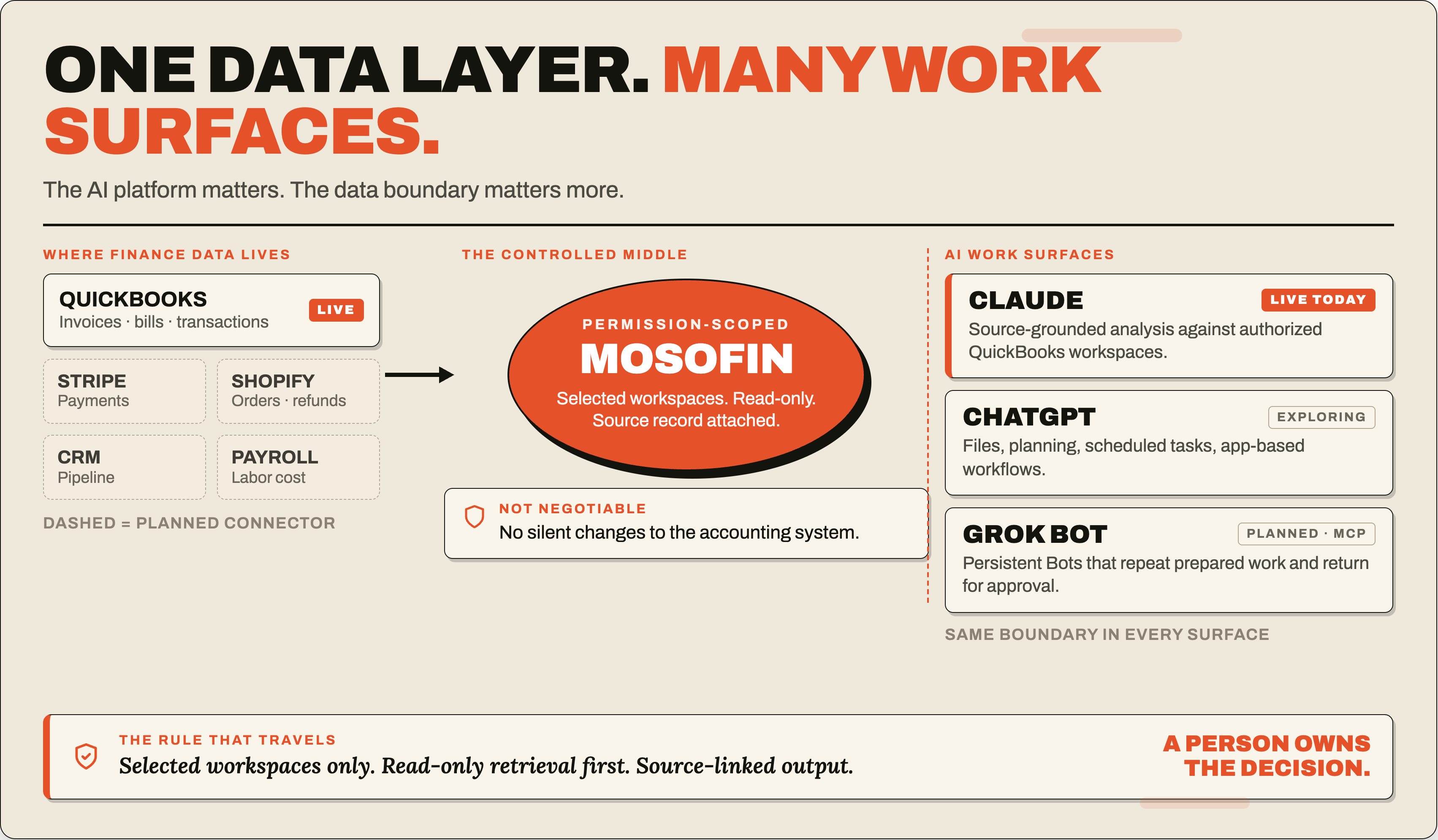
The connection to MosoFin is the workflow around it. MosoFin provides permission-scoped, read-only access to authorized QuickBooks data inside Claude. Anthropic says a Remote Control session retains access to the MCP servers and tools configured for its local Claude Code environment. When the MosoFin MCP server is available to that session, the user can supervise the same source-connected finance review from another device.
In plain language:
| Part | Job |
|---|---|
| QuickBooks | Remains the accounting system of record |
| MosoFin | Retrieves authorized financial data through read-only tools |
| Claude Code | Reviews, compares, explains, and prepares the requested output |
| Remote Control | Lets the person check and guide that Claude Code session from another device |
| Bookkeeper, owner, or finance professional | Confirms the facts and approves the decision or next action |
For example, a MosoFin-assisted session could review cash movement, identify overdue invoices, compare performance across selected workspaces, or run a Saved Skill. Remote Control can make it easier to stay involved when the review takes longer than one sitting.
It does not change MosoFin’s permissions. MosoFin’s tools remain read-only: they do not post journal entries, modify invoices, send payments, run payroll, or change the books. Learn more about how MosoFin works inside Claude.
The privacy point finance teams should understand
“Runs locally” does not mean “nothing leaves the computer.”
Anthropic says execution and filesystem access remain on the machine running Claude Code. However, its Remote Control connection and security documentation also says the synchronized session transcript—including messages, Claude’s responses, and tool activity—is stored on Anthropic servers while Remote Control is connected. Traffic travels through the Anthropic API over TLS.
That distinction matters when the session involves financial information.
Before using Remote Control for finance work:
- Use only the company, client, period, and accounts needed for the task.
- Do not put passwords, bank credentials, card information, or access tokens in prompts.
- Keep financial-data tools read-only unless a separate approved process requires more authority.
- Ask Claude to cite the source records behind material conclusions.
- Require human approval before changing the books, sending messages, making payments, filing taxes, or sharing a final report.
- Review Anthropic’s current data-use and retention terms for your plan and organization.
- Use the organization’s security and device controls when the work involves sensitive client or company information.
Our deeper guide, Is Claude safe for business financial data?, explains the difference between model training, product retention, local execution, and connected-tool access.
When Remote Control is useful—and when it is not
Remote Control is a good fit when:
- the task is already running on your computer;
- it may take long enough that you do not want to wait at your desk;
- Claude may need your answer or approval before continuing;
- the local files, tools, or MCP connections matter; and
- you want to return to the same conversation later.
It is a poor fit when:
- the computer needs to be turned off;
- the task should run entirely in a managed cloud environment;
- the organization cannot allow synchronized transcripts under its compliance policy;
- the workflow gives an AI unnecessary permission to change financial records; or
- nobody is responsible for checking the finished result.
Anthropic’s documentation compares Remote Control with Claude Code on the web, Slack, scheduled tasks, and other approaches. Remote Control is specifically positioned for steering work already running in a local environment from another device.
A sensible first finance test
Start with a task that is useful but reversible. A cash summary, overdue-invoice review, variance explanation, or missing-document checklist is safer than posting entries or sending payments.
Give Claude a simple instruction:
Review the approved records for this company and period. Cite the source amounts, list missing information, separate facts from assumptions, and ask before taking any action outside the review.
Then enable Remote Control and leave the desk for a short period. From your phone, confirm that you can:
- see what Claude has completed;
- understand what it still needs;
- answer a follow-up question;
- stop or redirect the work; and
- review the final result against the original records.
The goal is not to prove that finance can run without people. It is to see whether the work can continue without requiring the person to sit in front of the same screen.
The bottom line
Claude Code Remote Control is best understood as a way to stay involved in an unfinished local task after leaving your desk. The work continues in the Claude Code environment on your computer. Your phone gives you a way to watch, answer, guide, and approve.
For finance teams, that can make long reviews more convenient without removing the human checkpoint. Combined with a narrowly scoped, read-only data layer such as MosoFin, the useful pattern is straightforward:
Let the AI prepare and investigate. Let the person supervise and decide.
You can explore more practical examples in Claude for Finance: 8 Small-Business Use Cases or review MosoFin’s financial-data workflow.
Frequently asked questions
What does Claude Code Remote Control do?
Claude Code Remote Control lets you view and continue a Claude Code session running on your computer from a phone, tablet, or browser. The conversation stays synchronized, while execution and filesystem access remain on the computer running Claude Code.
Can I leave my desk while Claude Code is still working?
Yes. If the Claude Code session and Remote Control connection remain available, you can leave your desk, check progress from another device, answer follow-up questions, and guide the next step. If the computer sleeps or loses its network connection, the session reconnects when the machine comes back online.
Does Claude Code Remote Control work when my computer is turned off?
No. Remote Control connects to a Claude Code session running on your computer. If the computer is turned off, Claude cannot continue the local work until the machine and session are available again.
Does Remote Control keep every part of the session only on my computer?
No. Anthropic says execution and filesystem access stay on the local machine, but the synchronized session transcript, including messages, responses, and tool activity, is stored on Anthropic servers while Remote Control is connected.
How could Claude Code Remote Control work with MosoFin?
When a Claude Code session has access to the MosoFin MCP server, Remote Control can provide another way to supervise that same session from a phone or browser. MosoFin remains a read-only financial data layer; it does not post entries, change invoices, send payments, or modify QuickBooks records.
Sources
- Anthropic, Continue local sessions from any device with Remote Control. Official feature overview, setup instructions, device behavior, limitations, and comparison with other Claude Code approaches.
- Anthropic, Remote Control connection and security. Official explanation of local execution, filesystem access, transport security, synchronized transcripts, and retention.
- Anthropic, Claude Code security. Official security model and guidance for Claude Code environments.
- MosoFin, How MosoFin works. Product workflow, workspaces, MosoFin MCP server, and read-only QuickBooks access.
- MosoFin, Security and read-only access. MosoFin permissions, activity history, and financial-data safeguards.