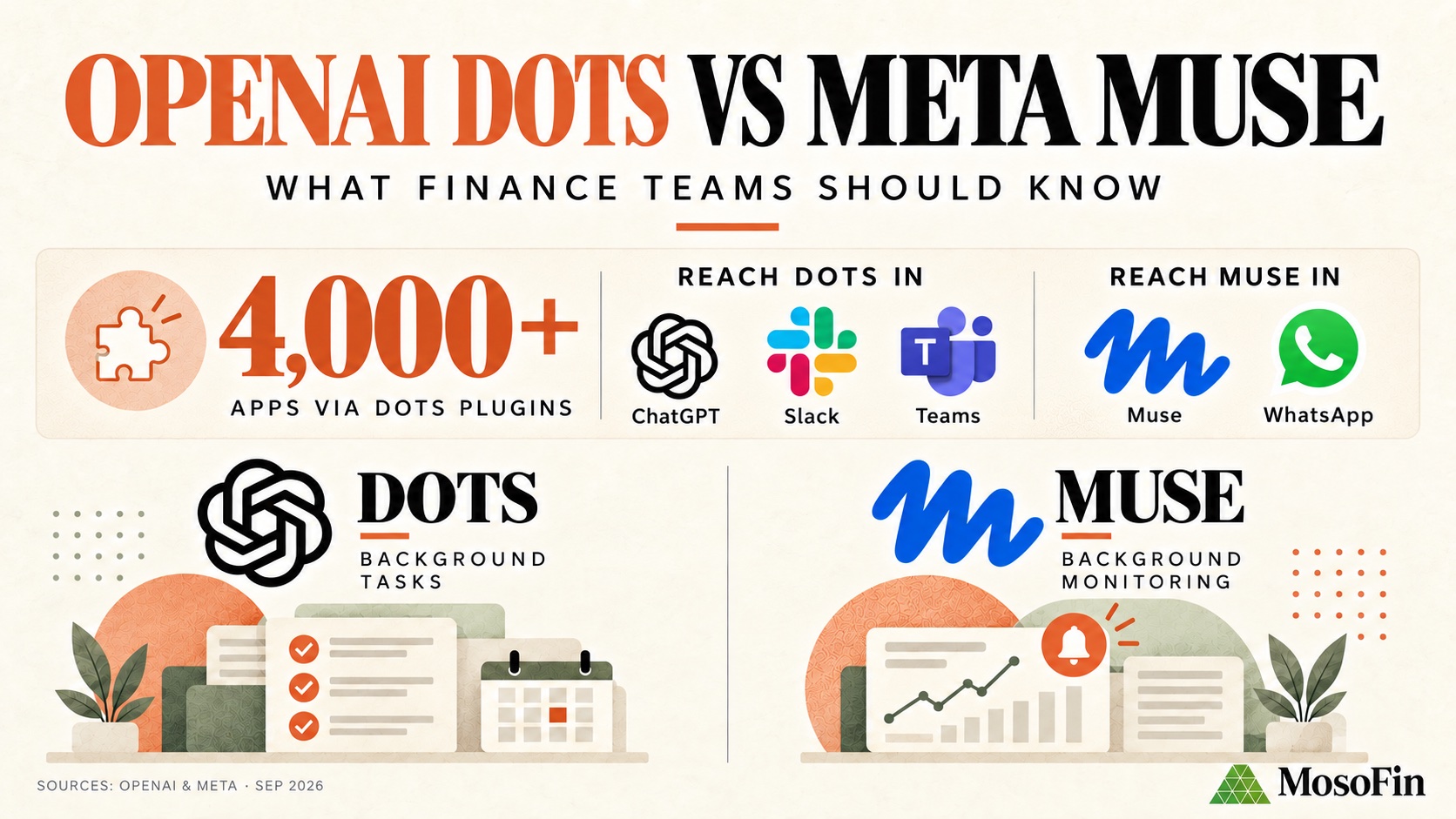
OpenAI introduced dots on September 29, 2026. Both dots and Meta Muse can work across connected apps and continue tasks in the background. For finance teams, the useful comparison is which apps each account can connect, what it can do, and when it asks a person to approve an action. See OpenAI’s announcement and Meta’s Muse announcement.
OpenAI Dots vs Meta Muse at a glance
| OpenAI dots | Meta Muse | |
|---|---|---|
| Where | ChatGPT, Slack, and Teams | Muse app and WhatsApp |
| Business offering | Specialist dots in focused enterprise pilots | Muse for Small Business with business connectors |
| Controls | App permissions, Custom Rules, activity view, and action review | App permissions, approvals for sensitive actions, and an audit trail |
| Availability | Rolling out to eligible Pro and Business Premium users; Enterprise and Edu beta requires admin enablement | Muse for Small Business: U.S. and Canada, adults 18+ |
The table reflects each company’s product descriptions, not a test of finance accuracy. App access depends on the connectors and permissions available to the account. Sources: OpenAI, Meta, and Muse for Small Business.
What OpenAI says Dots can do
OpenAI says dots run on a cloud computer and can connect to more than 4,000 apps through its plugin ecosystem. That count describes OpenAI’s ecosystem, not MosoFin connections. People can start in ChatGPT, Slack, or Teams and review or redirect a dot’s work. Access depends on the apps and permissions available to their account. OpenAI’s announcement.
Two launch details matter for finance work:
- Background research: OpenAI says this uses read-only tools in connected apps. Other actions follow app permissions, Custom Rules, and action review.
- Specialist dots: These are in focused enterprise pilots. OpenAI mentions invoice processing as an internal example, not a generally available accounting product.
Dots are rolling out to eligible Pro and Business Premium users. Enterprise access is in beta and requires administrator enablement. Availability varies by plan and market. OpenAI’s announcement.
What Meta says Muse can do
People can reach Muse in its app or through WhatsApp. Meta lists QuickBooks and Stripe among Muse for Small Business connectors. It says users approve sensitive actions and can review an audit trail; availability is limited to adults in the U.S. and Canada. See Meta’s small-business page.
Dots emphasizes ChatGPT, Slack, Teams, and a path toward specialist workplace agents. Muse emphasizes its app, WhatsApp, and small-business connections. Before choosing either, check that the specific app and permission controls cover your workflow.
A finance use case: prepare month-end review
Start with preparation. With the right app permissions, an agent could gather changes since the last review, flag missing information, and draft questions for the client. A person would check the work before posting entries, paying bills, or contacting clients.
For a month-end review across two clients, the output should keep each client’s records separate, name the reporting period and source for each figure, and flag open questions. That workflow depends on supported apps and permissions. OpenAI has not announced a ready-made multi-client accounting review or support for every finance system.
In a Reddit discussion about Dots, commenters debate useful tasks and the trust required to give an agent access. This is consumer opinion, not evidence about finance-team use or product performance.
Where MosoFin fits
MosoFin gives professionals separate, authorized client or entity workspaces for read-only QuickBooks review. Workspace permissions limit which data the AI destination can read; activity history records use. Teams can save a review as a Saved Skill and reuse the process with current data. See how MosoFin works and its read-only controls.
MosoFin publishes a custom app guide for ChatGPT and a custom connector guide for Muse. Its documentation does not list a Dots-specific connection. A ChatGPT app guide does not establish that MosoFin works inside Dots; confirm support and permissions before connecting client data.
Before using either agent with client books, check that it accesses only the intended workspace, supports its answers, and pauses before actions that need professional approval. See MosoFin’s financial connections and approval boundaries for AI finance work.