Finance teams are not short on AI tools. They are short on clean handoffs between data, analysis, and human review.
The useful question is not which chatbot is smartest. It is which work surface fits the finance job.
For a business owner, that job might be simple: “Why did cash get tight this month?” For an accounting firm, it might be messier: “Which clients have uncategorized transactions, overdue invoices, or missing month-end backup?” For a finance lead, it may span several systems: QuickBooks now, then Stripe, Shopify, CRM data, payroll, and operational records later.
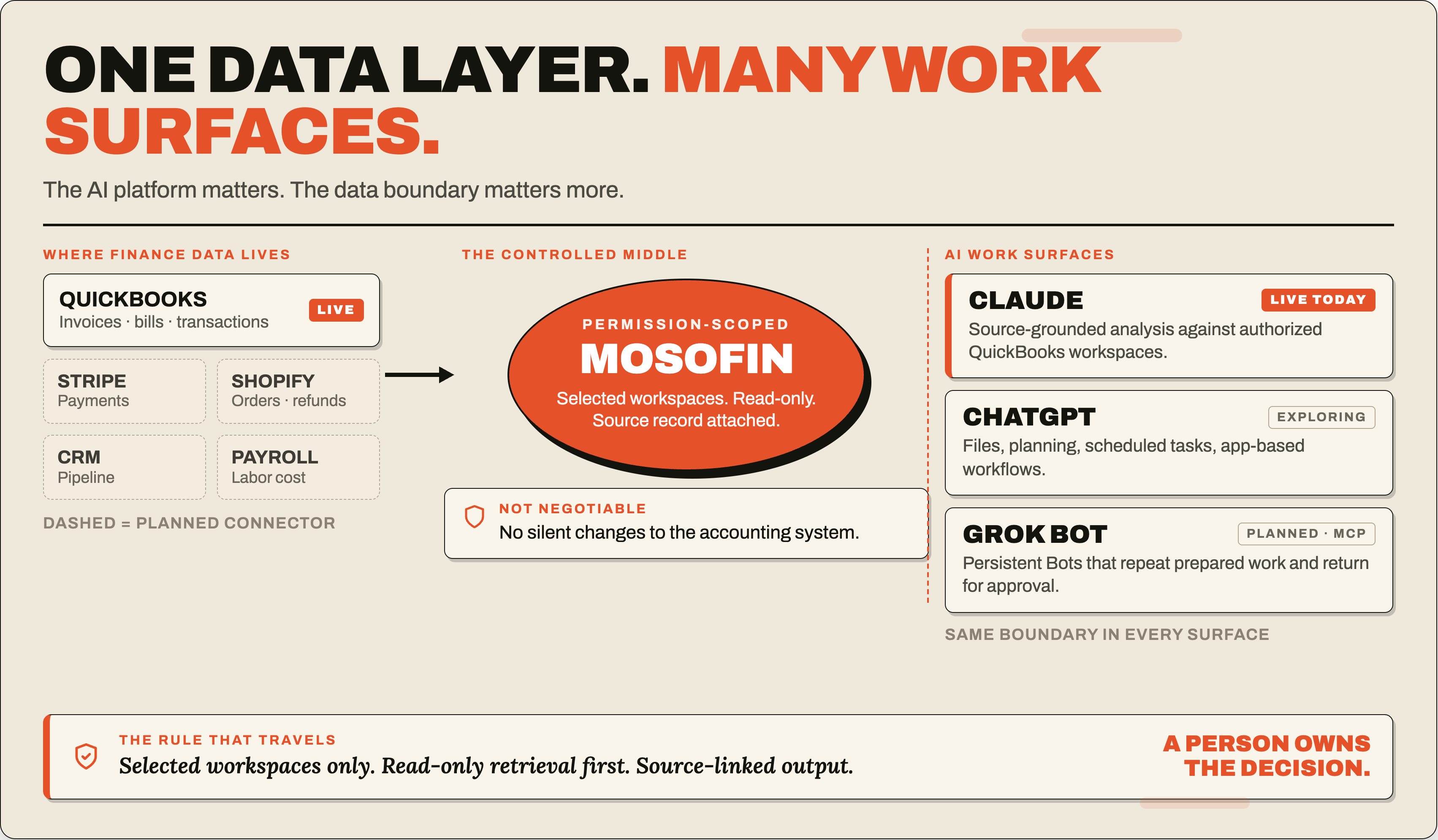
The AI platform matters. The data boundary matters more.
MosoFin’s role is to make financial data available in a controlled way: selected workspaces, read-only access, clear source records, and no silent changes to the accounting system. Today, MosoFin supports authorized QuickBooks analysis in Claude. Over time, MosoFin plans to support more data sources and more AI work surfaces, including Grok Bot through MCP-style connections.
The short version
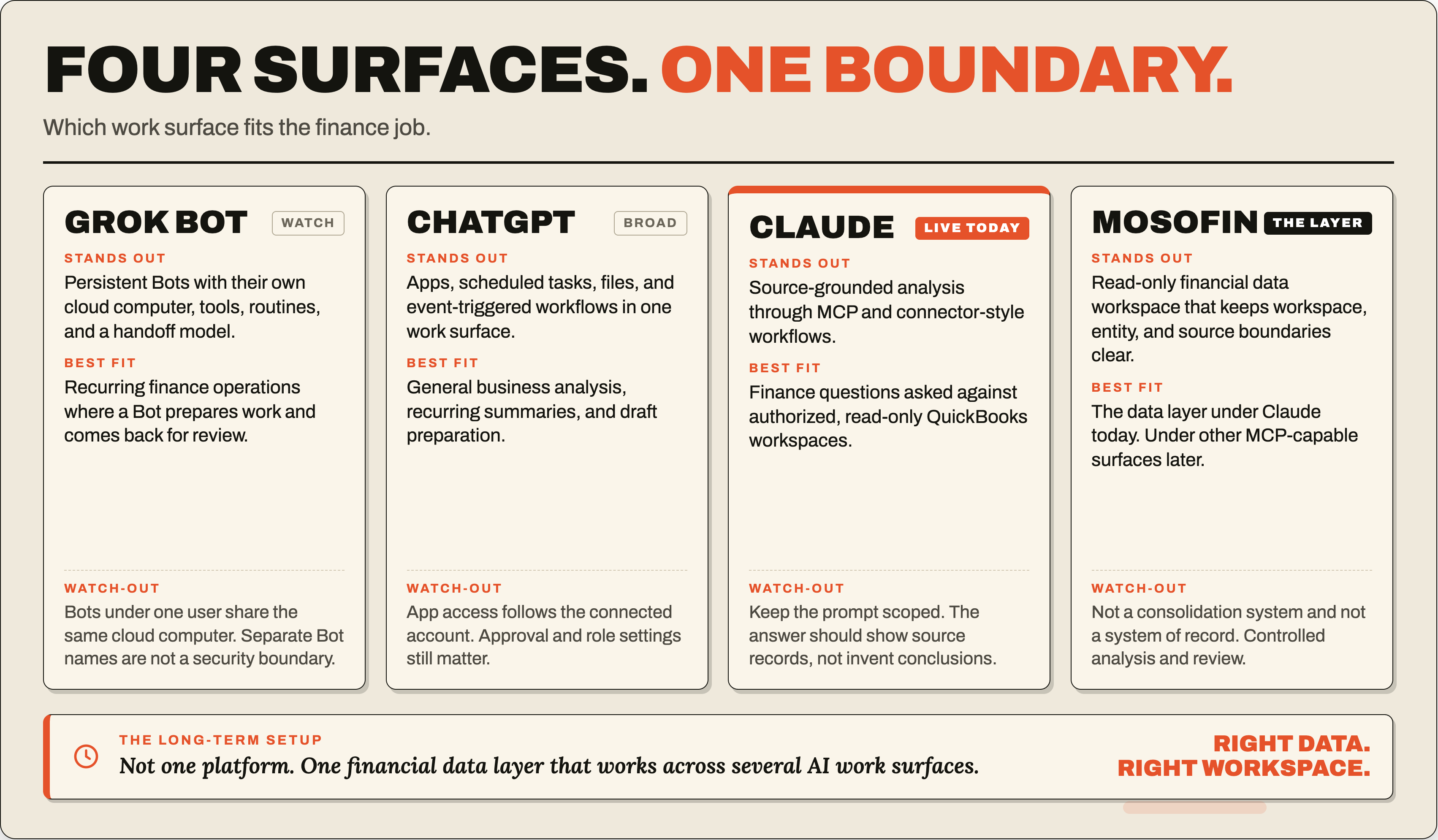
| Platform | What stands out | Best finance-team fit | Watch-outs |
|---|---|---|---|
| Grok Bot | Persistent Bots with their own cloud computer, tools, routines, and handoff model | Recurring finance operations where a Bot prepares work and comes back when review is needed | Treat the Bot computer carefully. xAI says Bots under one user share the same cloud computer, so separate Bot names are not a security boundary. |
| ChatGPT | Broad work surface with apps, scheduled tasks, plugins, files, and event-triggered workflows | General business analysis, recurring summaries, draft preparation, and future app-based workflows | App access follows the permissions granted to the connected account and workspace. Approval and role settings still matter. |
| Claude | Strong fit for source-grounded analysis through MCP and connector-style workflows | Current MosoFin workflows: ask finance questions against authorized, read-only QuickBooks workspaces | Keep the prompt scoped. The answer should show source records and review gaps, not invent accounting conclusions. |
| MosoFin | Read-only financial data workspace that keeps workspace, entity, and source boundaries clear | The financial data layer under Claude today, and potentially under Grok Bot or other MCP-capable platforms later | MosoFin is not a consolidation system or autonomous accounting system. It is for controlled analysis and review. |
What makes Grok Bot different
Grok Bot is new because it is not framed as a single chat window. xAI describes Grok Bot as persistent AI teammates that can use apps and websites on a cloud computer, collaborate with other Bots, learn routines from demonstration, and return when work is done or when approval is needed.
That changes the shape of a finance workflow.
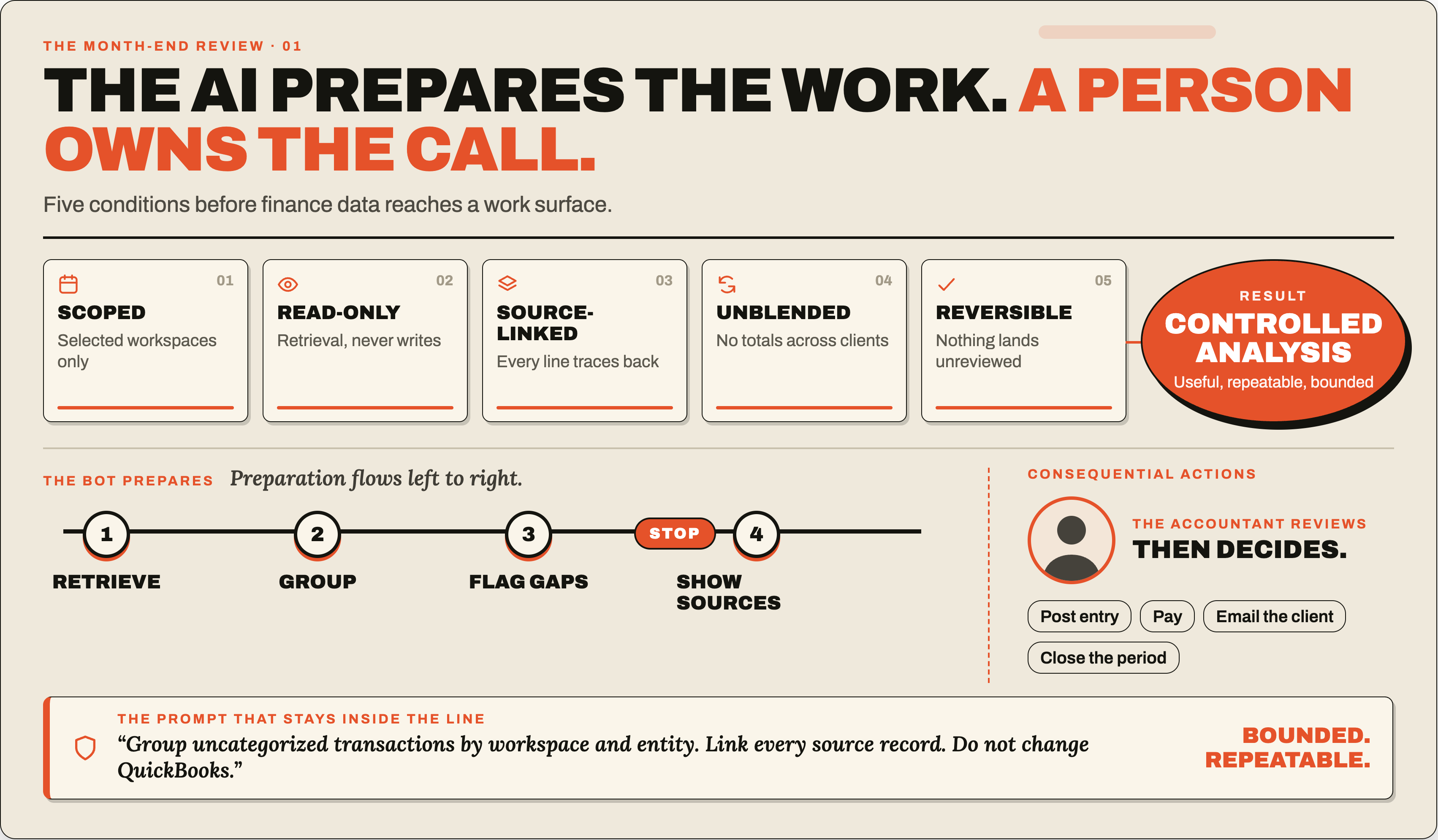
Instead of opening a chat and pasting the same month-end instructions every time, a finance team could eventually maintain a recurring review Bot. The Bot could know the shape of the review packet, retrieve allowed data through a MosoFin connector, group findings by workspace and entity, and leave a source-linked question list for a person.
For example:
Review the selected authorized workspaces for uncategorized transactions this week. Include workspace, entity, date, payee or description, amount, currency, current category, and source record. Group by workspace and entity. Do not combine totals across workspaces. Do not change QuickBooks.
That is the right kind of AI finance task. It is useful, repeatable, and bounded.
Grok Bot also makes sense for work that crosses apps: checking a report, opening a source system, saving a packet, and asking for approval before the next step. xAI says Bots can use tools, websites, files, and a persistent cloud computer. xAI also documents approval boundaries for sensitive actions such as sending messages, publishing content, purchases, financial transfers, deleting data, changing permissions, and accepting legal terms.
A Bot that can move across tools needs clear stopping points.
Where ChatGPT fits
ChatGPT is already a familiar place for many teams to ask questions, draft explanations, summarize files, and prepare recurring work.
OpenAI’s docs describe scheduled tasks that can run in the background and, on eligible plans, run from supported app events such as Gmail, Slack, and GitHub. OpenAI also documents apps and custom MCP-backed apps for connecting ChatGPT to approved tools and internal data.
For finance teams, ChatGPT fits well when the job is broad:
- “Summarize this board packet in plain English.”
- “Turn this sales export into questions for the finance meeting.”
- “Watch for a weekly file and draft a variance summary.”
- “Create a first-pass explanation for revenue, expenses, and cash movement.”
If MosoFin later ships a ChatGPT-facing app or MCP path, the same principle should apply: ChatGPT should receive only the financial data the user is allowed to review, and every answer should preserve source records. Until then, MosoFin should not claim ChatGPT support as a live product feature.
Where Claude fits today
Claude is where MosoFin has the clearest live fit today.
MCP is an open standard for connecting AI applications to external systems. The official MCP documentation describes AI applications connecting to data sources, tools, and workflows, including enterprise chatbots connected to multiple databases across an organization.
That maps cleanly to MosoFin’s current product boundary. A finance professional can work in Claude while MosoFin provides authorized, read-only QuickBooks data from selected workspaces. Claude can help reason through the question, while MosoFin keeps the source data scoped and reviewable.
Good Claude + MosoFin prompts are specific:
- “Show overdue invoices for these selected workspaces, grouped by client and aging bucket.”
- “Find uncategorized expenses over $500 for the current month and link each source record.”
- “Compare this month’s cash receipts and vendor payments against last month. Flag missing data.”
- “Prepare questions for the owner, but do not change records or contact anyone.”
That is the point of MosoFin inside an AI work surface: make the financial question easier to ask, while keeping the source trail visible.
Why MosoFin belongs in the middle
Finance data is scattered. QuickBooks may hold invoices, bills, accounts, and transactions. Stripe may hold payment activity. Shopify may hold order and refund activity. A CRM may hold pipeline and customer context. Owners and accounting teams often spend more time collecting these records than analyzing them.
MosoFin should reduce that collection work.
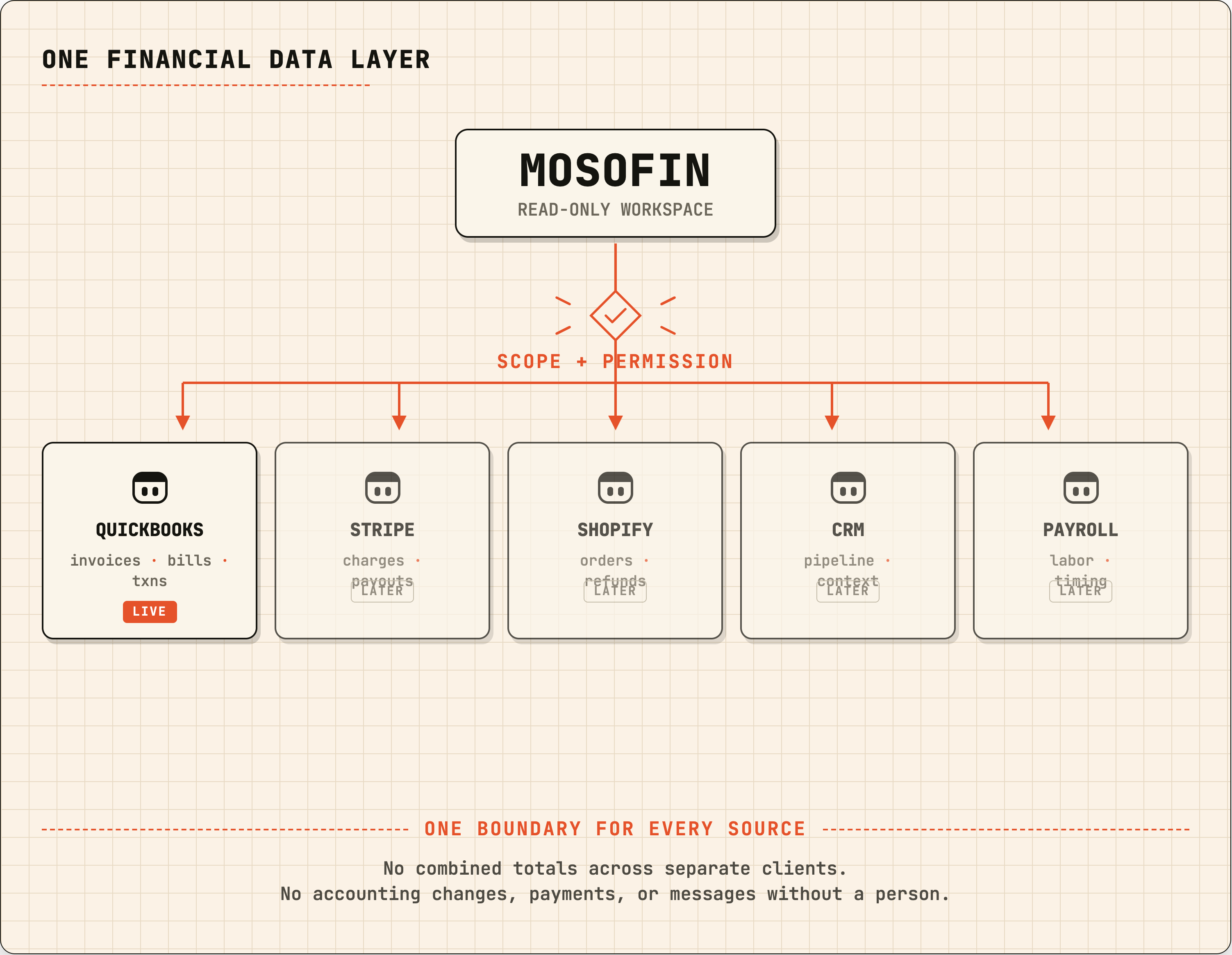
The product direction is a permission-scoped financial workspace that can feed an AI assistant enough context to answer a real business question. QuickBooks is the current live source. More sources can come later as separate connectors or agents, but the boundary should stay the same:
- selected workspaces only;
- read-only retrieval first;
- source-linked output;
- no combined totals across separate clients unless the user asks for a defined analysis view;
- no accounting changes, payments, messages, or approvals without a person.
That positioning keeps MosoFin honest. It is not trying to replace Fathom, Jirav, NetSuite, or formal consolidation systems. It is not a system of record. It is a source-conscious analysis layer for business owners and finance professionals who want to ask better questions without copying data from five platforms by hand.
A practical finance workflow across platforms
Imagine an accounting professional reviewing eight client workspaces before month-end.
In Claude today, they could use MosoFin to ask for a source-linked QuickBooks exception review across selected authorized workspaces. Claude helps organize the findings, and MosoFin keeps the data read-only and scoped.
In ChatGPT, a future MosoFin app could help the same professional prepare a weekly summary or trigger a review prompt from a saved workflow, if the app has the right permissions and approval settings.
In Grok Bot, a future MosoFin MCP connector could let a named Bot prepare the packet in the background, repeat the same routine each month, and return when it needs a human decision.
The same financial control should apply in all three places:
The AI can prepare the work. A person owns the accounting decision.
That is the line finance teams should protect.
Which platform should a finance team choose?
Choose Claude + MosoFin today when the job is source-linked financial analysis from authorized QuickBooks workspaces.
Watch Grok Bot if your team wants persistent AI teammates that can own repeatable preparation work across apps, especially once MosoFin has a verified connector path for it.
Use ChatGPT when the work is broader than accounting data: files, planning, summaries, recurring tasks, internal app workflows, or business communication drafts.
The better long-term setup may not be one platform. It may be one financial data layer that works across several AI work surfaces.
For MosoFin, that means building around the finance team’s real constraint: better access to the right data, from the right workspace, with the source record still attached.
Related MosoFin guides
- MosoFin and Grok Bot: a planned read-only financial data connector
- A planned Grok Bot workflow for source-linked month-end review
- Approval boundaries for AI finance bots
- QuickBooks reporting in Claude
- MosoFin workflows
Sources
- xAI, Grok Bot overview
- xAI, Designing Grok Bot for persistent agents
- xAI, Grok Bot for Enterprise
- xAI, Approvals, security, and privacy
- xAI, Grok Bot security FAQ
- xAI, Remote MCP tools
- OpenAI, Scheduled tasks in ChatGPT
- OpenAI, Apps in ChatGPT
- MCP, What is MCP?